 AUTO KEY PRESSER
 ⌨
FN.01
Any key
Auto-press any keyboard key — letters, numbers, Space, Enter, F-keys, arrows. Set your key in one click with the auto press key picker.
The free, open-source automatic keyboard presser that auto-taps or holds any key at a custom interval — toggled from any window with a global hotkey. Built for Roblox anti-AFK, idle-game farming, keeping your PC awake and QA testing. SendInput + scan codes land presses in full-screen games & RDP.
A focused keyboard auto presser with the controls that matter — nothing bloated, nothing hidden.
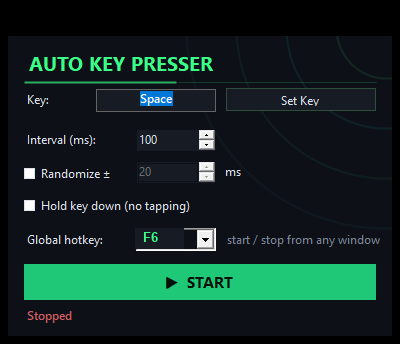
Auto-press any keyboard key — letters, numbers, Space, Enter, F-keys, arrows. Set your key in one click with the auto press key picker.
Dial the repeat rate from a blistering 5 ms up to 10 minutes. Perfect as a fast auto keyboard clicker or a slow anti-idle tick.
Rapid-tap a key, or flip on Hold to keep a key held down continuously — a true hold key down app and key holder.
Add a random ± jitter to every interval so presses aren't robotically uniform — a more natural cadence for idle automation.
Start/stop from any window with a rebindable global hotkey, F1–F12, default F6 — no alt-tab out of your game.
Built on SendInput + hardware scan codes, so presses register in full-screen games and RDP/VNC where other tools silently fail.
A clean, neon dark interface with everything on one panel. No menus to hunt through, no clutter — just the auto key presser controls.
Lightweight Windows MSI installer (~15 MB). Uses only the .NET Framework already on Windows 10/11 — no extra dependencies to chase for keyboard auto presser.
MIT licensed and fully auditable on GitHub. A free open source key presser with zero ads and zero telemetry.
One automatic keyboard presser, four missions.
Stay active without babysitting your keyboard. Run a Roblox anti-AFK key presser to beat the idle-kick, hold W to walk in Minecraft, farm an MMO or incremental game by auto-pressing a skill or attack key, and dodge anti-idle timers. Example: set Key = W, enable Hold, press F6 — done.
Stop sleep, screensavers and away-status. A mouse jiggler alternative that taps a harmless key on an interval to keep PC awake and keep screen on, so you stay "online / green" on Teams, Slack and Discord. Example: set Key = Shift, interval 60 s, Start.
Automate repeated keystrokes for UI and stress testing, hammer an input to reproduce bugs, or keep a session alive during long builds. A dependable repeat key software for Windows that also runs over RDP/VNC. Example: set Key = Enter, interval 200 ms, add ± randomize.
Offload the boring stuff. Repeat a key through long forms, spreadsheets or batch chores where the same keystroke fires over and over. A simple macro key presser / spam key tool that just works. Example: set Key = Tab, tune the interval, Start.
Everything on one panel — no digging through menus.
Set the key, interval and hotkey, then hit START.
// Idle · Stopped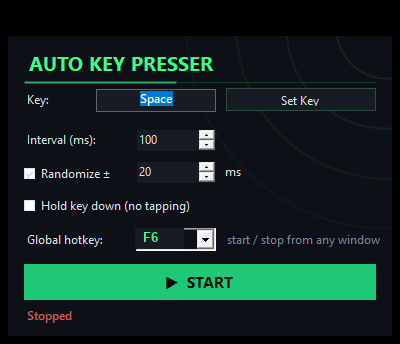
Randomize ± timing for a natural, non-uniform cadence.
// Config · Randomize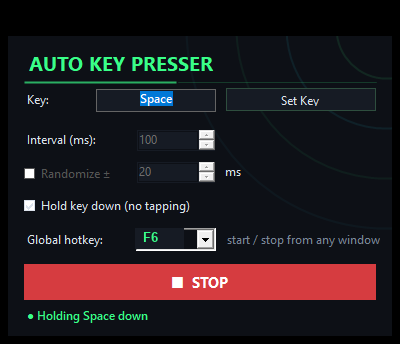
Flip on Hold mode to keep a key held down.
// Active · HoldLightweight install, no config files, no learning curve.
Download the zip, unzip and run the MSI installer. Standard Windows install to Program Files.
Click Set Key and pick the key to auto-press — W, Space, Enter, a skill key, anything.
Dial the interval (5 ms–10 min), add ± randomize, or tick Hold key down for continuous hold.
Hit START — or trigger the global hotkey F6 from inside any game or window.
Free forever, open-source, lightweight MSI installer. Just download & install — standard Windows install/uninstall.
Every release ships with a published SHA-256 hash and a VirusTotal report. Compare the hash of your zip against the one on the releases page:
certutil -hashfile AutoKeyPresser.zip SHA256
Heads-up on antivirus: because any key presser injects keystrokes (SendInput), some engines show a heuristic warning for input-automation tools. This one is fully open source — read the source, verify the hash, or build the exe yourself.
Everything about the auto keypresser download, safety and game use.